One payment. 14-day refund. Windows 10 and 11, 64-bit.
Hiring out 10 minutes of video: from $5,000. With VidSupreme: $27 and cents of AI.
ChartsTimelinesMaps
Press play to watch a video made by the app
Bar charts/Rankings/Timelines/Maps/Comparisons/Donut charts/Big numbers/Checklists/Kinetic type/Quotes/
Easy to start. No tech skills needed.
If you can install a program and sign in with Google, you can make a video. The app walks you through the first time.
1
Install
Download the app and double-click it, like any other program.
Windows 10 or 11.
2
Sign in with Google
One click. No password to invent, no key to type.
Your purchase is found by your email.
3
Add your AI key, then type a topic
The app explains where to get the key. Paste it once, then press the button.
Free models work with a free key.
No subscriptionNo watermark after you buyReview the script before pictures and voice are made14-day refund1:1 support from the maker
What is an AI key?
It is like a prepaid card for an AI service. You create one in a few minutes on the provider's website (we recommend OpenRouter), and paste it into the app. The app then asks the AI to write, draw and speak for you, and the provider charges you only for what you use. The app shows you where to click the first time. The steps on the provider's website can change.
Ready to make your first video?One payment of $27. 14-day refund.
Every clip below is a scene VidSupreme draws. Filter them, point at one, tap to play. This showcase shows 36 of the 54 scene types: 20 of the 30 in the app you buy, and 16 of the 24 more that come as optional upgrades. A few appear twice, once with icons and once with emoji.
The clips are silent and use sample content. Your videos use your topic or script.
Like what you see?One payment of $27. 14-day refund.
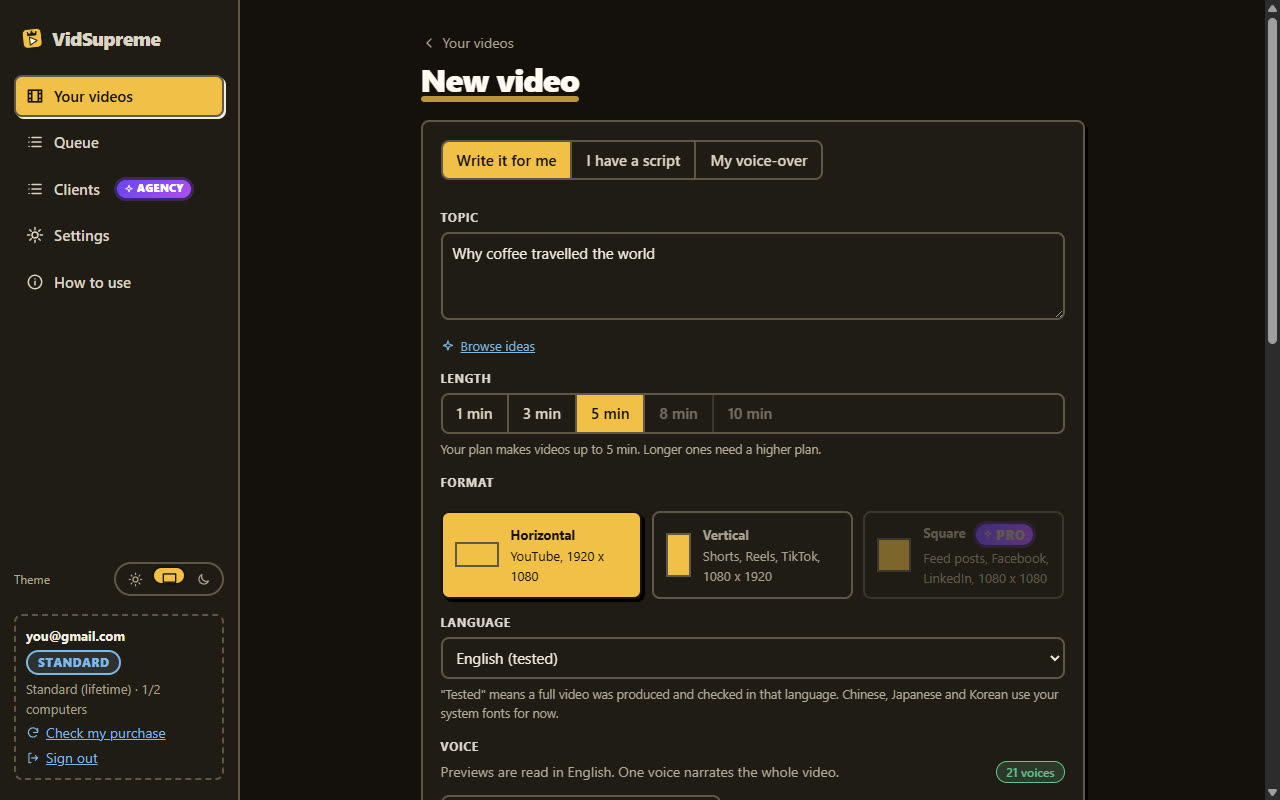
Give it a topic or scriptType a topic, or paste a finished script. Your own words stay exactly as you wrote them.
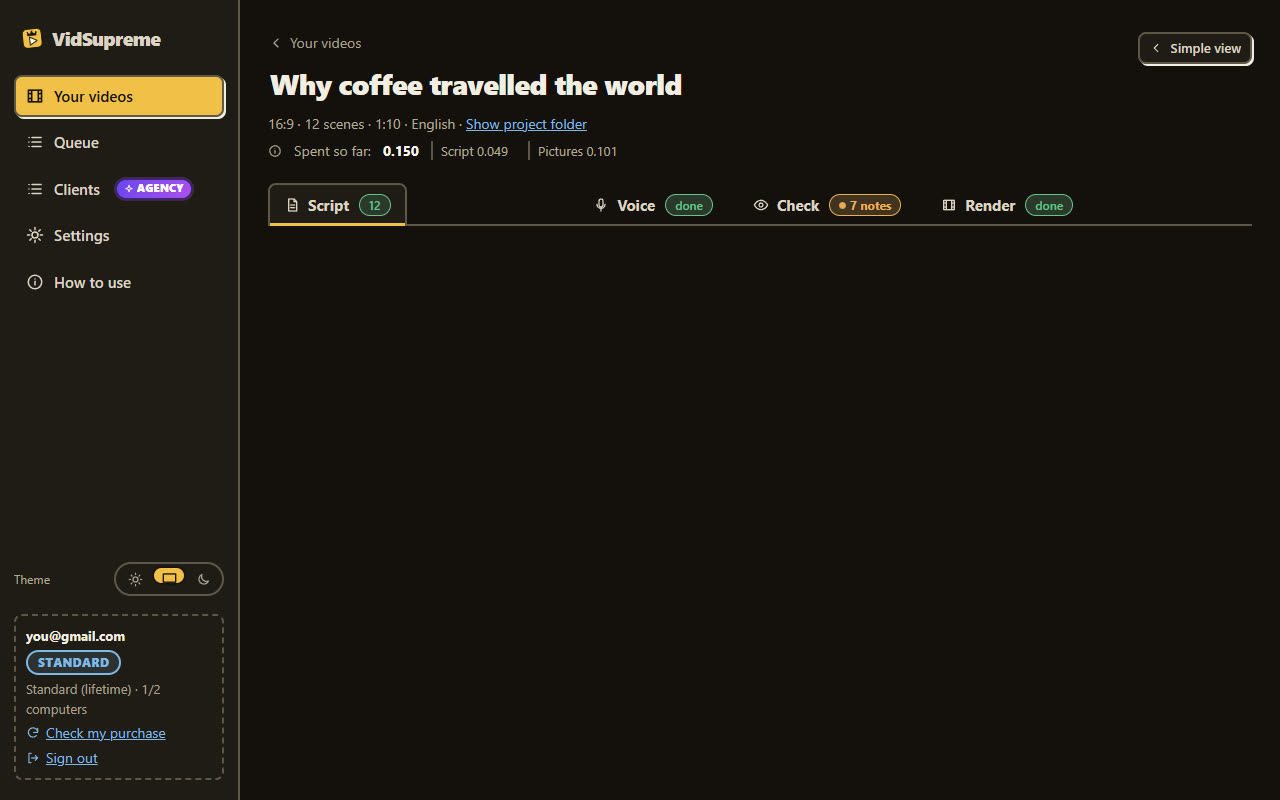
Review the scenesThe app writes a storyboard: a scene for each part, with its narration. Read it and change anything before a single picture or voice is made.
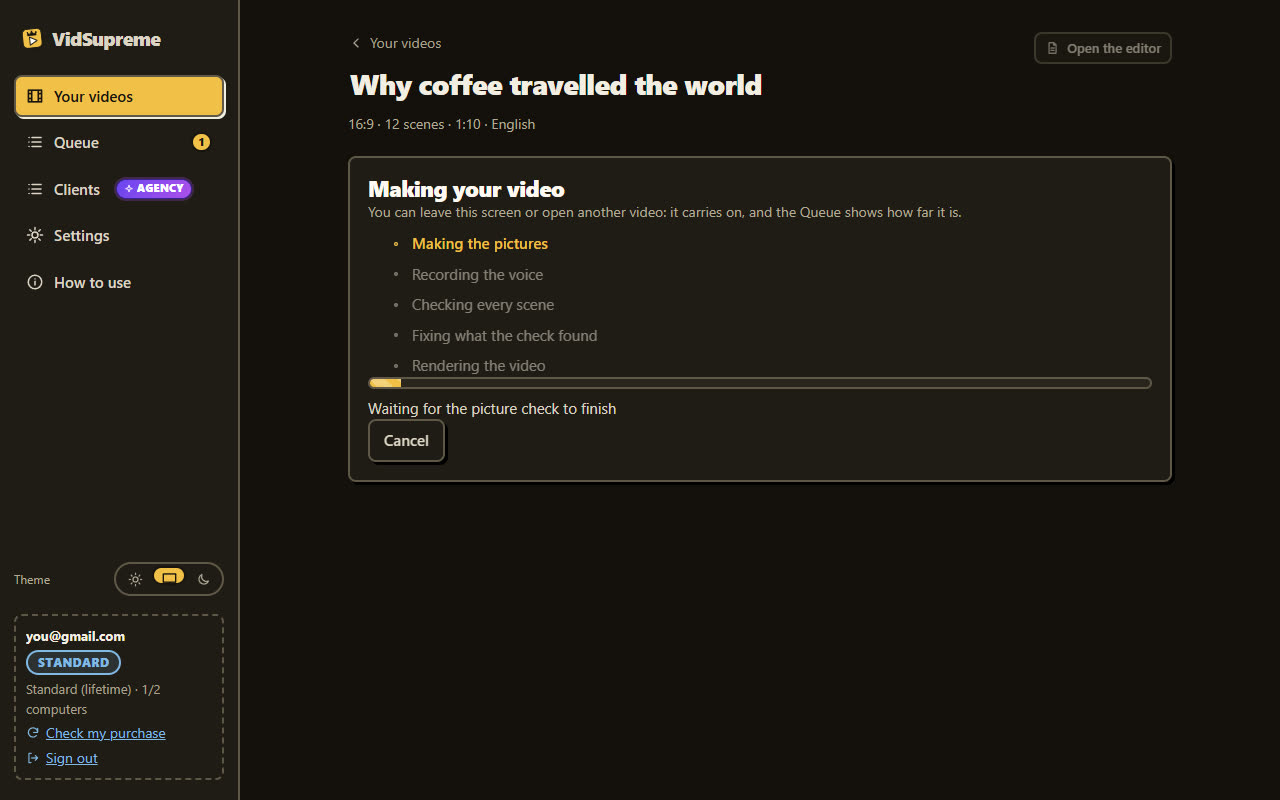
Pictures and voiceThe app makes the pictures. Pick one of 21 AI voices and listen to it first, or use your own recording.
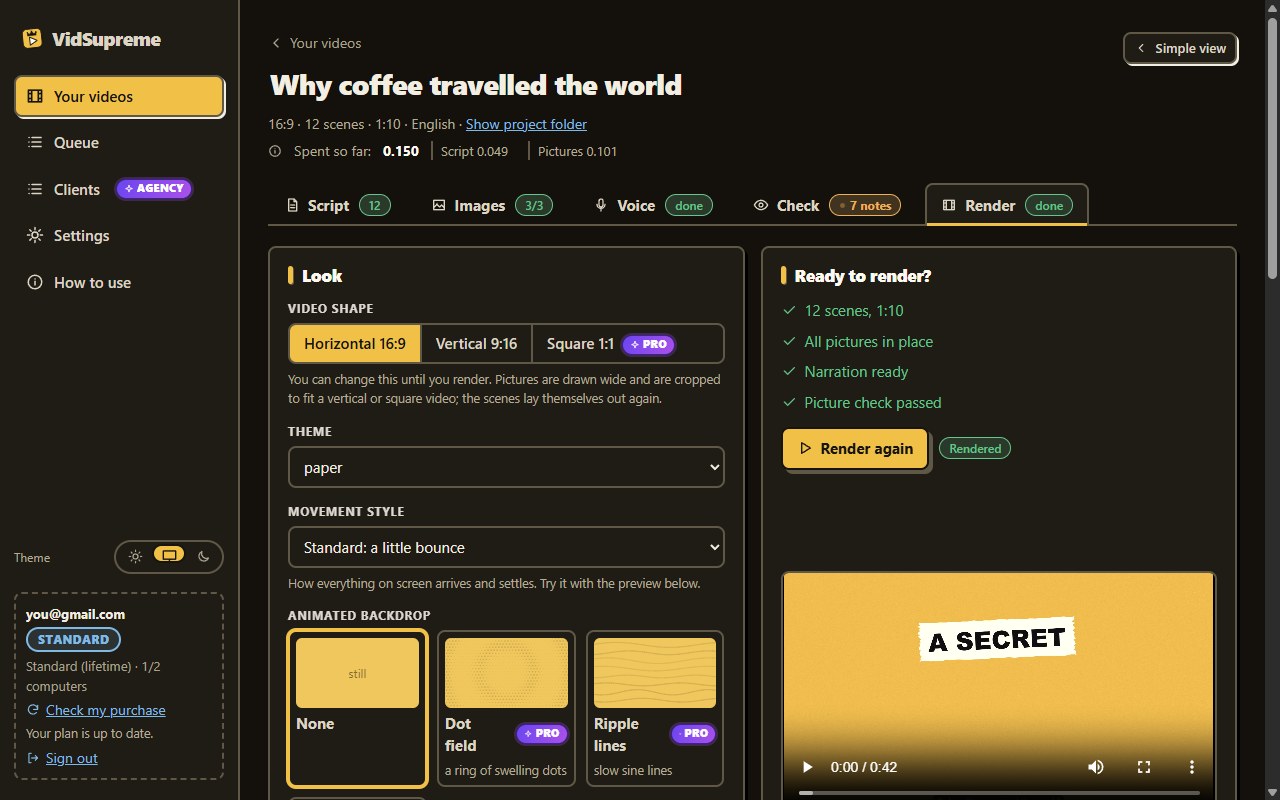
RenderA built-in check looks at every scene for cut-off text and fixes what it can. Then the MP4 renders on your PC, with captions. Save it, or open the folder.
Slides with bullets, or a scene that moves
Drag the handle. The right side is a real scene from the app, moving.
Coffee
Many people drink coffee
Some countries drink more
Finland is at the top
A text slideVidSupreme
From an idea to a finished video
One app does the work that usually takes a writer, a voice artist and an editor.
1
Idea
A topic, a question or a few notes.
→
2
Script
AI-written, or your own words kept exactly.
→
3
Scenes
Charts, timelines, maps and text that move.
→
4
Voice
An AI voice, or your own recording.
→
5
MP4
Captions, sound and a picture check, then render.
Everything in the base app
All of this is included in the one payment.
✎
AI script, or yours
Let the AI write the script from a topic, or paste your own and keep every word.
▦
54 scene types, 30 in the app you buy
The app: bar and donut charts, rankings, big numbers, timelines, comparisons, maps, checklists, quotes and kinetic type. Optional upgrades add 24 more.
♫
Voice, your way
AI voices (a free voice model is available), or record and use your own voice.
▬
Word-timed captions
Captions follow the narration word by word. A subtitle file (.srt) is saved next to the video.
♪
Sound effects and music
Sound effects on the cuts, and your own background music: pick a file, set the level, start point and fades.
↔
Wide and vertical
16:9 for YouTube and 9:16 for Shorts, Reels and TikTok, from the same script.
✓
Picture check and auto-fix
Before it renders, the app looks at real frames and flags text that is cut off or covered, and fixes what it can.
▶
8-second preview
See how a scene looks in a few seconds before you spend a full render.
★
No watermark, up to 5 minutes
Your videos are clean, up to five minutes long. The free trial adds a watermark and limits.
$
See your balance in the app
Press Check balance in Settings and the app shows how much credit is left on your OpenRouter account, and any cap on your key. You always know what you have spent.
✎
Edit anything
Change any word, colour or scene. Generate or import your own pictures.
★
Niche starters
Three niche groups are free, with topics and a tone ready to go.
●
Icons and emoji
336 icons are drawn stroke by stroke as each point is spoken, or use any emoji: in steps, checklists, rankings, timelines, comparisons and more. The AI picks them, and you can change any one.
☺
People on screen
Posts, chats and quotes show a drawn person, and the same name always gets the same face. An optional upgrade adds a drawn presenter who points at your key points.
↻
Updates built in
The app updates itself. Your licence works on two of your computers.
What early users say
Short excerpts, word for word, from people who tried VidSupreme. Where someone got a free copy, it says so.
The market, in public numbers
What explainer videos and the people who make them cost, read from public pages. This is market data, not results made with VidSupreme, and not a promise of what you will earn.
Each figure shows where and when it was read. Pages change, so check the source.
Videos in your language
The script can be written in any language the AI model you choose can write. The narration depends on the voice model, and the app only offers a language when the voice model lists it.
0languages with a voice in the app
Anylanguage for the script, as long as your AI model writes it
0voices to choose from, with a listen-first sample
The list follows the voice model, so it can grow without a new version of the app. Chinese, Japanese and Korean use the fonts on your computer. Arabic and other right-to-left languages are not supported yet. You can also record your own voice in any language and use your own script.
What it would cost you to get the same video made
Typical freelancer prices, read on 29 October 2026 from rate guides and sellers' own pages, with a screenshot of each page. They are directional: you may pay less, or a lot more.
One 3-minute video, script and voice-over alone$200 to $600from freelancers, before anyone animates or edits anything
The same video with VidSupreme, everything includedabout $0.47 to $0.99in AI usage, plus the one-time $27 for the app
Part of an explainer video
Typical freelancer price
For a 3-minute video
In VidSupreme
Writing the script
$50 to $150 per finished minute
$150 to $450
The AI writes it, about $0.04 a minute (measured)
Voice-over
$50 to $150 for a 2 to 3 minute explainer (about 350 words)
$50 to $150
An AI voice: $0 to $0.017 a minute, or your own voice
The whole animated video, made for you
$500 to $3,000 for a 60-second video from a freelancer
$1,500 to $9,000
$27 once, then cents per minute
What these videos normally cost
Sources, each with a screenshot below: scriptwriter rates, voice-over rates, thumbnail designer rates, explainer video costs. The first two rows are pieces of the work; the third is the whole video, so do not add them together. A 3-minute whole video is worked out at three times the 60-second price. These are market figures, not a promise of savings.
Scriptwriter ratesfueler.io/blog/freelance-scriptwriter-rates-short-vs-long-form, screenshot of 29 Oct 2026 · open the pageVoice-over ratesvoicebros.com/en/voice-over-rates, screenshot of 29 Oct 2026 · open the pageThumbnail designer ratesadsnipper.com/?p=2496, screenshot of 29 Oct 2026 · open the pageExplainer video costsvideoexplainers.com/blog/how-much-does-explainer-video-cost, screenshot of 29 Oct 2026 · open the page
Click a screenshot to enlarge it. These are other companies' pages, shown only as the source of the figures above; the pages may change after the date shown.
Two things to pay for. No monthly fee, no credits to top up with us.
The app, one time$27
Yours to keep, for two of your computers.
The AI, as you use itabout $0.16 to $0.33
per minute of finished video, paid to your AI provider, not to us.
Every month$0
No subscription and no renewal.
One minute of video (about 7 scenes, 4 pictures)
Budget models
Better models
Script
$0.002
$0.04
4 pictures
$0.134
$0.268
Voice
$0 to $0.013
$0.017
Word timing for captions
$0.006
$0.006
About
$0.16
$0.33
Measured in October 2026 through OpenRouter. Provider prices change, and the app shows the cost before it spends. A 3-minute video is roughly $0.47 to $0.99 in AI usage.
Cost promisePress Check balance in the app before and after you make a video, and see what it really cost. If I was not honest about the cost, or it costs you much more than I said, ask for a refund within your 14 days.
Work it out for your own videos
Today, per year$0
VidSupreme, first year$0
Difference, first year$0
The price of one video today is whatever you pay a freelancer, an editor or a tool for it. Prices of other services change, so we do not quote them.
Keep the money, make the videos.One payment of $27. 14-day refund.
Basic $9 a month per seat, or $4 billed yearly; Pro $30, or $15 billed yearly (a 50% yearly discount was shown)
Credits that do not roll over; minutes are not stated
Synthesia (talking avatars, a different kind of video)
Starter $19 a month, or $14 a month billed yearly
About 12 extra video minutes a month on top of 10 free
VidSupreme
$27 once, then about $0.16 to $0.33 per minute of video to your own AI provider
Your PC renders; videos up to 5 minutes; two computers per licence
The cost of a whole year, by how much you make a month
Pictory Starter$300 to $348
VidSupreme$85 to $146
Pictory Starter covers up to 30 minutes a month ($25 a month billed yearly, or $29 monthly). VidSupreme: 360 minutes at $0.16 to $0.33 a minute is $58 to $119 of AI for the whole year, plus the $27 app once.
Pictory Professional$420 to $708
VidSupreme$200 to $383
Pictory Professional covers up to 90 minutes a month ($35 a month billed yearly, or $59 monthly). VidSupreme: 1,080 minutes at $0.16 to $0.33 a minute is $173 to $356 of AI for the whole year, plus the $27 app once.
Pictory Teams$1,428 to $2,388
VidSupreme$603 to $1,215
Pictory Teams covers up to 300 minutes a month ($119 a month billed yearly, or $199 monthly); above that its Enterprise plan is priced on request. VidSupreme: 3,600 minutes at $0.16 to $0.33 a minute is $576 to $1,188 of AI for the whole year, plus the $27 app once.
Synthesia Pro$708 to $1,068
VidSupreme$142 to $265
Synthesia Pro covers up to about 60 minutes of video a month ($59 a month billed yearly, or $89 monthly). Its unlimited-minutes plan is Enterprise, priced on request. VidSupreme: 720 minutes at $0.16 to $0.33 a minute is $115 to $238 of AI for the whole year, plus the $27 app once. Synthesia makes videos with a talking presenter; VidSupreme makes animated explainers, so this compares the cost of a minute, not the same video.
Minute caps: every plan above stops at its monthly minutes (30, 90, 300 and about 60). When you reach the cap you wait for next month or move up a plan. VidSupreme has no cap on minutes or videos: you pay your own AI provider for each minute you make. Because that cost grows with the minutes, the gap is widest at lower volumes. Pictory and Synthesia prices read from pictory.ai/pricing and synthesia.io/pricing on 30 October 2026. The two tools make different kinds of video, and your own AI usage depends on the models you pick. These figures are not a promise of savings.
What is different, besides the price
Hire an editor
Online AI video tools
VidSupreme
How you pay
For every video
A monthly plan with limits or credits
One payment for the app, about 16 to 33 cents per minute to your AI provider
Your own script
If you brief them
Varies by tool
Kept word for word
Where it runs
With them
On their servers
On your PC
Waiting time
Days
Minutes, in a queue
As long as your PC takes to render
Charts, maps and timelines
If they design them
Varies by tool
Built in, drawn for your topic
Watermark
No
On trials and cheaper plans
None after you buy
A fair comparison depends on what you need. An editor suits work that needs a human eye on every frame. Online tools suit people who prefer not to install anything. VidSupreme suits people who make explainers often and want to own the tool.
Why you can trust it
You are paying a stranger on the internet, so here is exactly what is safe, what is tested and what we do not promise.
G
Sign in with Google: we never see your password
You sign in on Google's own page, the same way you sign in to other apps
Google tells us only your email, name and account ID, enough to find your purchase
The app asks for no Gmail, Drive, Calendar or contacts
You can remove the app's access at any time at myaccount.google.com/permissions
Ask for your money back within 14 days, through the marketplace you bought from.
Try it first
A free trial: 3 videos a day, with a watermark, before you pay anything.
On your PC
Projects and files stay on your computer. Rendering happens there too.
A cost promise
About $0.16 to $0.33 of AI for a minute of video (measured October 2026; provider prices change). Check your balance in the app. If I was not honest, or it costs far more than I said, ask for a refund within your 14 days.
Your own AI key
Requests go from your PC to the provider you chose. We do not resell AI or add a fee.
Real screens
Every picture of the app on this page is a screenshot of the real app.
1:1 support from the maker
Write to [email protected] before or after you buy. The person who made the app answers you directly, one to one.
What we do not promise
VidSupreme makes the videos. It does not promise views, subscribers or income: those depend on your topic, your audience and the platform. We only show results that real people have given us permission to share, with the dates and where the numbers come from.
Real results people shared
These are the results of the people shown, over the periods stated. They are not typical and not a promise.
Try it on your own topic.One payment of $27. 14-day refund.
The free trial lets you make real videos before you pay.
Free trial
VidSupreme
Videos
3 per day
No daily limit
Length
1 minute
Up to 5 minutes
Watermark
Yes
None
Wide (16:9) and vertical (9:16)
Wide only
Both
Everything in this table is in the app you buy. Nothing in it is moved behind an upgrade. Pro, an optional upgrade offered after you buy, adds square 1:1 videos and videos up to 10 minutes.
One payment, yours to keep
Hiring this out: 10 minutes of finished video$5,000
VidSupreme, the app plus about $3.30 of AI$30
You keep about $4,970
At the lowest freelancer price we found, $500 for a 60-second video. Your own figures will differ.
$27$47
Launch price ends in--. Includes the Windows app, free updates, the free voice options and 1:1 support from the maker.
14-day refund if it is not for you. Secure checkout on the marketplace.
After checkout you may be offered optional upgrades. The app you buy is complete without them.
14 daysTry it on your own topics. If VidSupreme is not what you hoped for, ask for your money back within 14 days.
Cost promiseCheck your balance in the app. If I was not honest about the cost, or it costs you far more than I said, you can ask for a refund within your 14 days.
Questions
I am not technical. Can I still use it?
Yes. You install it like any program, sign in with Google and paste one key. The app guides you the first time, and you can write to [email protected] if you get stuck: the maker answers you directly, one to one.
What happens if my AI credit runs out?
The app cannot ask the AI for more until you add credit with your provider. Nothing you already made is lost, and rendering a video you have finished does not use any credit. Free models are available with a free key.
Do I need an AI account?
The app uses an AI provider for the script, pictures and voice. You bring your own key (OpenRouter works, and it has free models). The provider bills you directly, usually about 16 to 33 cents per minute of video. VidSupreme does not add a fee on top.
Does it run on my computer?
Yes. It is a Windows app (Windows 10 and 11, 64-bit). Videos render on your PC, so long videos take longer on slower machines. Projects and media stay on your computer.
Is there a monthly fee?
No. The price on this page is one payment for the base app.
Why does Windows warn about an unknown publisher?
The installer is not code-signed yet. Choose More info, then Run anyway. The app updates itself afterwards.
How many computers can I use?
Your licence works on two of your computers.
Are there extras I have to buy?
No. The app is complete as it is. After checkout you may be shown optional upgrades, each with a "No thanks" choice, and you can skip all of them.
Can I get a refund?
Yes, within 14 days of buying. Ask through the marketplace you bought from.
Which videos can I make with it?
Explainers for products, history, how-tos, courses, local businesses and client work, in many languages. Check the terms for the details of use.
A note from the maker
One last thing before you decide...
Make your first video today
Charts, tables and motion for any topic, on your own PC.
Disclaimer: Please note that this product does not provide any guarantee of income or success. The results achieved by the product owner or any other individuals mentioned are not indicative of future success or earnings. This website is not affiliated with FaceBook or any of its associated entities. Once you navigate away from FaceBook, the responsibility for the content and its usage lies solely with the user. All content on this website, including but not limited to text, images, and multimedia, is protected by copyright law and the Digital Millennium Copyright Act. Unauthorized copying, duplication, modification, or theft, whether intentional or unintentional, is strictly prohibited. Violators will be prosecuted to the fullest extent of the law.
We want to clarify that JVZoo serves as the retailer for the products featured on this site. JVZoo® is a registered trademark of BBC Systems Inc., a Florida corporation located at 1809 E. Broadway Street, Suite 125, Oviedo, FL 32765, USA, and is used with permission. The role of JVZoo as a retailer does not constitute an endorsement, approval, or review of these products or any claims, statements, or opinions used in their promotion.
 VidSupreme
 The real app